Integrate QuoteX with KLIENT PSA (Formerly KROW)
Published on June 16, 2026 QuoteX
QuoteX to KLIENT PSA Integration Guide: Rate Cards, Roles & Resource Requests
Migrating pricing and staffing data between QuoteX and KLIENT PSA can feel daunting, especially when rate cards, roles, and resource demand all need to line up correctly. This guide walks you through exactly how the two systems relate to each other, where the data mapping gets tricky, and the steps your implementation team should follow to get it right the first time.
What This Guide Covers
- The two systems involved in this integration and how they talk to each other
- Field-level mappings for Rate Cards and Roles (pricing sync)
- Field-level mappings for Resource Requests (staffing demand)
- A 5-step implementation roadmap
- Common pitfalls teams run into, and how to avoid them
| ⚠ Important — Read Before You Build |
| This document is a guidance framework , not a frozen or finalized technical mapping. Treat these definitions as a baseline recommendation. Implementers, developers, and data architects should make final technical, structural, and architectural decisions based on their own independent evaluations, system constraints, and discovery findings for CodeyLabs' QuoteX and KLIENT PSA. |
Key Concepts
The Two Systems: Source vs. Target
Every integration starts with knowing which system owns the data and which system receives it:
- Source — CodeyLabs' QuoteX (PSC): where pricing, rate cards, and resource demand are first defined during pre-sales
- Target — KLIENT PSA (KROW): where that data lands to drive project delivery, staffing, and scheduling
Everything in this guide maps a QuoteX (PSC-prefixed) field or object to its corresponding KLIENT PSA (Krow-prefixed) field or object.
The Integration Challenge: Why It Matters
QuoteX and KLIENT PSA were built for different purposes — QuoteX for quoting and pricing, KLIENT PSA for scheduling and delivery — so their data models don't line up field-for-field. Left unmanaged, this mismatch causes three common problems:
- Pricing drift — bill and cost rates fall out of sync between what was quoted and what gets billed
- Duplicate or orphaned roles — the same role gets created multiple times under slightly different names
- Lost staffing demand — resource requests raised in QuoteX never surface as actionable requests for workforce management teams
Integration Scenario 1: Rate Cards & Roles (Pricing Sync)
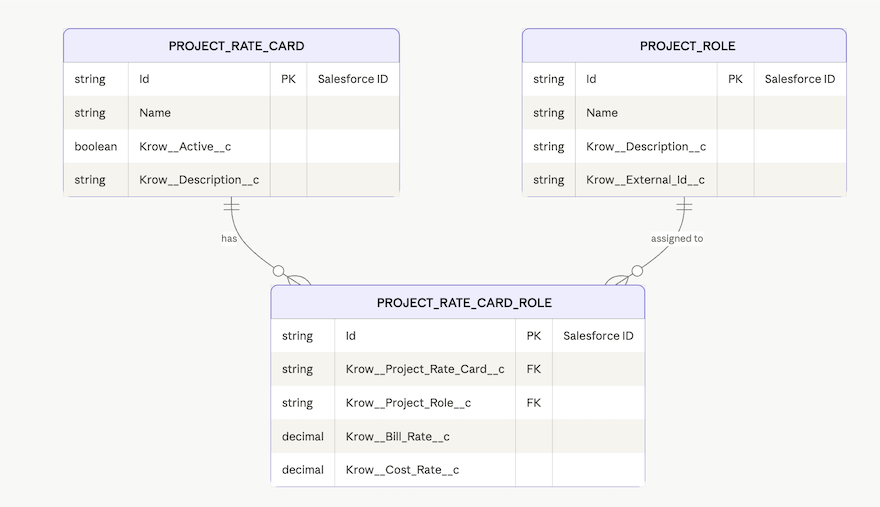
The data mapping specification below establishes the blueprint between the source QuoteX (PSC) Rate Card object and the target KLIENT PSA (KROW) object . The goal is to translate rate card definitions into structured target-system pricing so that role identities and rates align across both systems.
Real-world example:
Senior Developer | Bill: $180/hr | Cost: $75/hr | US-East
| PSC Rate Card | FieldSource | TypeKrow | FieldTarget | TypeActionMapping | Notes |
| Identity & Naming | |||||
| Code | Text(20) | – | – | – | – |
| Resource Role | Picklist | Name | Text(80) | Transform | Combine with Resource Level, Practice and Region for uniqueness, e.g. "Senior Developer" |
| Description | Long Text(32000) | – | – | – | Create custom field on Krow Role |
| External Id | Text(18) | Krow__External_Id__c | Text(18) | Direct | Use as upsert key in migration |
| Migration Id | Text(18) | – | – | – | Fallback if External Id is blank |
| PSC Rate Card Number/Id | Auto Number | – | – | – | Auto number, not portable |
| Rates & Pricing | |||||
| Suggested Bill Rate | Currency(16,2) | Krow__Bill_Rate__c | Currency(16,2) | Direct | Global fallback bill rate |
| Average Cost Rate | Currency(16,2) | Krow__Cost_Rate__c | Currency(16,2) | Direct | Global fallback cost rate |
| Role Level Rate | Formula (Text) | – | – | – | Parse formula output; use only if Suggested Bill Rate is null |
| Currency | Picklist | CurrencyIsoCode | Picklist | Direct | Requires multi-currency org |
| Classification | |||||
| Resource Level | Picklist | – | – | – | Create picklist on Krow Role; map PSC levels |
| Practice | Lookup(PSC Practice) | – | – | – | See CodeyLabs reference and KLIENT Practices Object |
| Primary Resource Skill | Lookup(PSC Skill) | – | – | – | See CodeyLabs reference and KLIENT Skill Certifications Object |
| Region | Lookup(PSC Region) | – | – | – | See CodeyLabs reference and KLIENT Region |
| Status & Validity | |||||
| Start Date | Date | Krow__Active__c | – | No mapping | Belongs on Krow Rate Card, not Role |
| End Date | Date | Krow__Active__c | – | No mapping | Belongs on Krow Rate Card, not Role |
| Ownership & System | |||||
| Created By | Lookup(User) | – | – | – | System field |
| Last Modified By | Lookup(User) | – | – | – | System field |
KLIENT PSA — Rate Card / Role Object ERD. Reference: Rate Card Role Object , Roles Object , Rate Card Object
 Integration Scenario 2: Resource Requests (Staffing Demand)
Klient focuses heavily on scheduling and allocation grids, managing placeholders within assignments or dedicated request templates. Here's how staffing demand raised in QuoteX flows into KLIENT PSA.
| POV: QuoteX Resource Request Integration with Klient PSA Project Resources |
Reference: Project Resources Object · Project Assignment Object
Primary Demand Object: QuoteX's add-on PSC_Resource_Request__c (Resource Request). See the CodeyLabs reference article .
How it holds demand: Unfulfilled resource needs are instantiated via Resource Requests for workforce management teams to manage. This object defines the placeholder demand — for example, "Developer Needed" for X hours from Start Date until End Date, with a defined bill rate and cost rate.
Demand mapping: Klient handles inline task-level demand using unassigned Krow__Project_Assignment__c placeholder records on the Gantt chart or Request Planner view before a named Krow__Project_Resources__c is staffed. Learn more .
| POV: QuoteX Direct Integration with KLIENT's Resource Request |
Reference: Resource Request Quick Start · Video walkthrough
| Target: Krow Resource Request Field | Krow Data Type | Source: PSC Timeline Resource Field / Logic | Integration / Mapping Logic & Notes |
Id | ID | N/A (System Generated) | Internal Salesforce ID generated upon upserting records into Klient. |
Name | Text (Auto-Number) | N/A (System Generated) | Automatically determined by Klient's object settings. |
Krow__Project__c | Lookup / Master-Detail | Krow Project mapping logic | Map to the target Klient Project record ID that matches your opportunity/estimate. |
Krow__Project_Role__c | Lookup | Role__c (Text) | High priority alignment: Krow expects a lookup to a Project Role record. Run a translation step matching your text strings ( Role__c or structured Resource_Role__c ) to the ID of the corresponding record in Klient's role master table. |
Krow__Project_Resource__c | Lookup | N/A (blank for open requests) | Leave empty for unstaffed requests. If the QuoteX resource line is already tied to a named user, populate with their Klient Project Resource ID. |
Krow__Status__c | Picklist | Hardcoded initial value | Typically mapped to a default status such as "Draft," "Requested," or "Open," depending on your downstream fulfillment workflow. |
Krow__Start_Date__c | Date | Derived from allocations | Map the earliest period's Date__c from the child PSC_Timeline_Resource_Allocation__c records. |
Krow__End_Date__c | Date | Derived from allocations | Map the latest period's End_Date__c from the same child allocation records. |
Krow__Requested_Hours__c | Number (16,2) | Total_Hours__c | Direct map. QuoteX's summary total hours value maps directly to Krow's requested tracking capacity. |
Krow__Notes__c | Long Text Area | Custom concatenation / metadata info | Good target for auxiliary details without direct fields, such as the Speciality__c label, the full structured string from Resource_Role__c , or Notes__c from Timeline Resource. |
5 Implementation Steps
1. Inventory your source data
Export all active Rate Cards, Roles, and Resource Requests from QuoteX. Identify duplicates, blanks, and inconsistent naming before you map anything.
2. Build the role translation table
Since Krow__Project_Role__c expects a lookup rather than free text, create a lookup table matching every distinct QuoteX Role__c / Resource_Role__c value to a KLIENT Project Role record.
3. Configure custom fields and picklists
Create the KLIENT-side custom fields called out as "Transform" or "No mapping" above — Description, Resource Level, and any organization-specific fields needed to preserve QuoteX context.
4. Migrate Rate Cards and Roles first
Load pricing data before staffing data. Resource Requests depend on Project Role records existing in KLIENT, so sequencing matters.
5. Migrate Resource Requests and validate
Load Resource Requests using the field mapping table above, then spot-check a sample of records for correct dates, hours, and role linkage before going live.
Common Pitfalls
1. Leaving Project Role as free text instead of a lookup
Problem: Text-matching role names is fragile — a typo or extra space silently breaks the mapping.
Solution: Always resolve roles to a lookup ID via the translation table in Step 2, and validate every unmatched value before migration.
2. Migrating Resource Requests before Rate Cards and Roles
Problem: Krow__Project_Role__c lookups fail if the target role record doesn't exist yet, leaving requests orphaned.
Solution: Follow the sequencing in Step 4 — pricing and role data always loads first.
3. Treating Start Date / End Date as direct field mappings
Problem: QuoteX's rate card Start Date and End Date don't map directly to any Krow Role field — teams sometimes leave them blank and lose validity windows entirely.
Solution: Remember these belong on the Krow Rate Card object, not the Role, and plan a separate mapping step for rate card validity periods.
Key Takeaways
- QuoteX is the source system for pricing and demand; KLIENT PSA is the target system for delivery and staffing.
- This mapping is a starting framework, not a finalized technical spec — validate it against your own org's configuration.
- Role names must be resolved to a lookup ID in KLIENT; free-text matching is not supported.
- Rate Cards and Roles should always migrate before Resource Requests.
- Resource Request dates and hours are derived from child allocation records, not copied directly.
- Use
Krow__Notes__cto preserve QuoteX context that doesn't have a direct target field.
Reference Resources
QuoteX (CodeyLabs)
KLIENT PSA
- Rate Card Role Object
- Roles Object
- Rate Card Object
- Project Resources Object
- Project Assignment Object
- Resource Request Quick Start
Next Steps: 7-Step Action Plan
- Assign an implementation owner from both the pre-sales (QuoteX) and delivery (KLIENT) sides.
- Export and audit current QuoteX Rate Cards, Roles, and Resource Requests for data quality issues.
- Build and validate the role translation lookup table.
- Create any required custom fields and picklists in KLIENT PSA.
- Run a pilot migration of Rate Cards and Roles in a sandbox environment.
- Run a pilot migration of Resource Requests against the sandboxed roles, then validate dates, hours, and linkage.
- Schedule the production migration and confirm a rollback plan before go-live.
Knowledge Article Number: KA-00266