QuoteX Estimation Logic Handbook: From Scope to Statement of Work
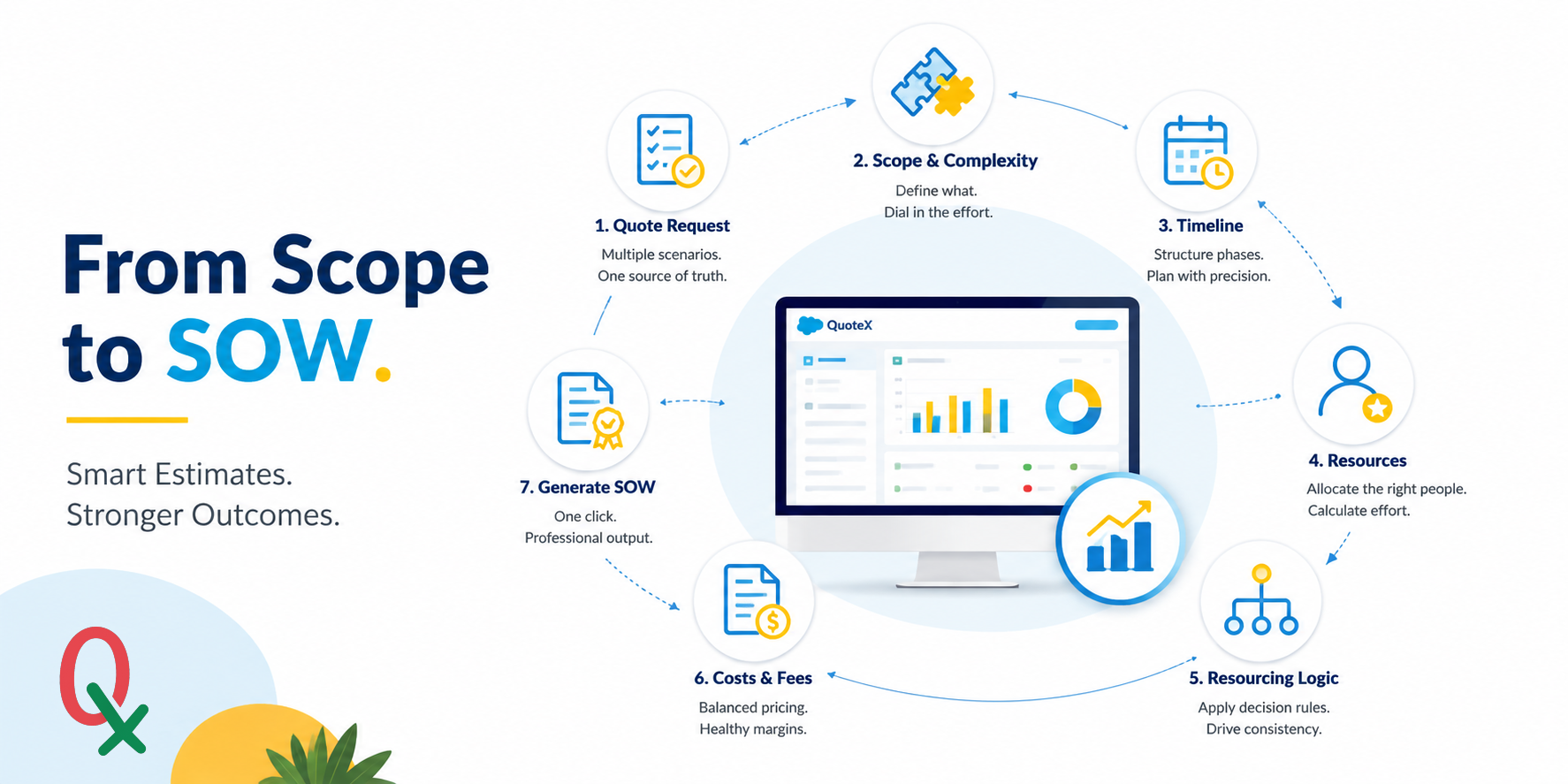
1. Foundations of the QuoteX Estimation Engine
At its core, QuoteX is a Salesforce-integrated estimation engine designed to transition professional services teams from the limitations of manual spreadsheets into a centralized, collaborative architecture. By residing natively within the Sales Cloud, QuoteX eliminates data silos and ensures that every estimate is intrinsically linked to Salesforce Opportunities and Accounts.
The project hierarchy begins with the Quote Request (QR) , which serves as a bridge to the broader Salesforce ecosystem. A single QR can house multiple Quote Scenarios , allowing architects to model various delivery options—such as a "Rough Order of Magnitude" (ROM) versus a "Detailed Level of Effort" (LOE). When a specific scenario is designated as the "Primary Quote," the system triggers a roll-up of all summary totals back to the QR, ensuring executive visibility.
Key Concept: The Salesforce Advantage Integrating directly into Salesforce provides a distinct technical advantage for data integrity. Because QuoteX uses native Salesforce objects, it ensures real-time synchronization with account data.
However, architects must note a critical system constraint: Currency Persistence . Once a quote is saved, the currency is locked for the Quote record and can't/shouldn't be changed, as this ensures the stability of the associated Rate Card data.
Once the high-level project request is established and the currency is locked, the architect must shift from the project container to the granular building blocks of effort: the Project Scope (Scope Size Effort).
--------------------------------------------------------------------------------
2. The Scope Item: Building the DNA of an Estimate (Quote) - Not necessary but important for bottom up.
In QuoteX, every project is a collection of Scope Items sourced from the Scope Library , a reusable catalog of services. The precision of an estimate depends on how these items are modified using four specific levers: Category , Multiplier , Specialty , and Complexity Level .
While Category and Specialty define the type of work and the technical niche required, the Multiplier and Complexity Level act as the primary drivers of effort.
Complexity Levels Comparison
The following table illustrates how the Complexity Level adjusts the baseline Level of Effort (LOE) hours:
| Complexity Level | Impact on Effort | Description |
| Low | Reduced | Applied to repetitive, well-defined, or low-risk tasks. |
| Medium | 100% (Default) | The standard baseline for the estimated effort. |
| High | Increased | Applied to tasks with high uncertainty or technical volatility. |
Insight Pillar: The Multiplier acts as a global adjustment - useful for scaling work based on volume (e.g., repeating a task across five different business units). Conversely, Complexity provides a nuanced, percentage-based shift that accounts for the difficulty of the client's specific environment without changing the fundamental nature of the scope item.
Defining "what" needs to be done is only the first half of the equation; we must now structure "when" these tasks occur across the project lifecycle.
--------------------------------------------------------------------------------
3. The Timeline: Visualizing Phases and Periods
The Timeline Library allows you to deconstruct a project’s duration into a structured grid of Periods based on a defined Frequency (Weekly, Monthly, Quarterly, or Yearly). This structure serves as the logical foundation for resource placement and financial forecasting.
Steps for Creating a New Timeline
- Define Frequency: Select how work periods are measured (e.g., Weekly).
- Set Periods: Indicate the Initial Number of Periods (e.g., 12 periods for a 3-month project).
- Select Currency: Designate the currency (e.g., USD, EUR). This must align with your Quote currency to ensure Rate Card compatibility.
- Manage RateCard: Use this function to verify that assigned rates are active. The system will display expired cards in red.
- Map and Merge Phases: Select cells to designate Phases (e.g., Plan, Design, Dev, QA). Selecting the same phase for consecutive periods automatically merges them into a single, continuous logical block.
With the structural timeline phases established, the architect can begin the critical task of integrating human resources to execute the work.
--------------------------------------------------------------------------------
4. Resource Allocation and Effort Calculation
Resources represent the "who" of the estimate. QuoteX pulls Resource Roles from predefined Rate Cards , which include list prices, regional variations, and specific skill requirements.
Effort vs. Allocation
Effort can be entered manually or derived through the Percentage Allocation (%) feature. By entering a value (e.g., 50%), the system automatically calculates the hours for every period in the timeline based on that role's involvement relative to the time frequency.
Teacher’s Note: The 250-Hour Threshold & Visual Indicators To maintain system stability and realistic project modeling, QuoteX enforces a 250-hour effort limit per period. Furthermore, pay close attention to the color of resource rates:
- Black: Standard rate within default parameters.
- Green: The rate is within the allowed discount threshold.
- Red: Indicates an Expired Rate Card or a discount that exceeds the maximum allowed threshold. Red font is an immediate signal for data maintenance or pricing review.
Insight Pillar: The Billable toggle is a critical tool for margin management. It allows the tracking of non-billable roles—such as client-side Project Managers or internal subcontractors—to capture Total Cost without inflating the Net Fees (the price the client pays).
While manual allocation provides control, complex delivery models are best managed through the automated logic of Resourcing Plan Templates.
--------------------------------------------------------------------------------
5. Advanced Logic: Resourcing Plans and Staffing Rules
To ensure consistency across estimates, SMEs can build Resourcing Plan Templates . These utilize Decision Rules to derive effort for supporting roles based on the effort of a "Core Role" (e.g., a Developer).
Hypothetical Decision Rule Example
| Role | % of Core | Reference Role (OF ROLE) | Phase (OF PHASE) |
| Senior BA | 50% | Developer | Design |
| Logic: If the Developer is assigned 40 hours in the Design Phase, the Senior BA is automatically assigned 20 hours. |
Staffing Rules and Rate Blends further refine the financial model by calculating:
- Average Rates: The mean rate of a group of roles.
- All-Inclusive Rates: The base role rate plus a calculated Expense Allocation (%) (e.g., adding T&E into the role's base rate for a simplified client view).
This advanced logic aggregates into the final project totals, where costs, fees, and margins are balanced.
--------------------------------------------------------------------------------
6. The Final Math: Costs, Fees, and Discount Models
The financial health of a quote is determined by the relationship between Total Costs , Net Fees , and ASM (Average Sales Margin).
The Calculation Logic:
- Net Fees: Calculated as
(Total Fees - Total Discount). If theCOST IMPACT ASMorT&E IMPACT ASMflags are enabled, the system adds billable other costs or expenses to the Net Fee total. - Conservative ASM: Enabling the "Impact ASM" flags is a conservative accounting practice. It includes Travel & Expenses and Other Costs in the margin calculation, ensuring that perceived profitability accounts for all project expenditures.
Presentation Mode: Internal vs. Client View
| Feature | Standard View (Internal) | Presentation Mode (Client) |
| Resource Costs | Visible | Hidden |
| Margins/ASM | Visible | Hidden |
| Rates | List Price & Adjusted Price | Adjusted Rate Only |
| Summaries | "Resource Fees" Label | "Resource Price" Label (in Resource-Level model) |
| Font Color | Black, Green, or Red | Uniform Black Font |
QuoteX supports three Discount Models : "Timeline Level Only," "Resource Level Only," and "Both." The choice of model dictates whether discounts are applied as a blanket percentage at the project header or as granular adjustments to individual roles.
--------------------------------------------------------------------------------
7. Summary: The Path to the Statement of Work (SOW)
The culmination of the estimation process is the Generate SOW action. This feature utilizes Document Templates and SOQL queries to synthesize all scope, timeline, and financial data into a professional document. By using merge fields, QuoteX ensures the SOW remains a "mirror" of the Salesforce record.
Golden Rules for Accurate Estimation
- Verify Currencies: Confirm the Rate Card matches the Quote currency; remember that once the Quote is saved, the currency is locked.
- Check Rate Card Expirations: Treat red font as a priority. It indicates an expired card or an invalid discount that will compromise financial accuracy.
- Validate Needs: Always use the Validate Needs button before finalizing. This is the ultimate "check and balance" that ensures the human resource hours on the timeline align with the hours required by the Project Scope.
- Respect the 250% allocation Cap: Adhere to the per-period limit to avoid resource over-allocation and system errors.
- Toggle Billable Status: Accurately mark third-party or client-contributed roles as "Non-Billable" to maintain an accurate Net Fee while tracking the project's true Total Cost.