Scope Effort Matrix
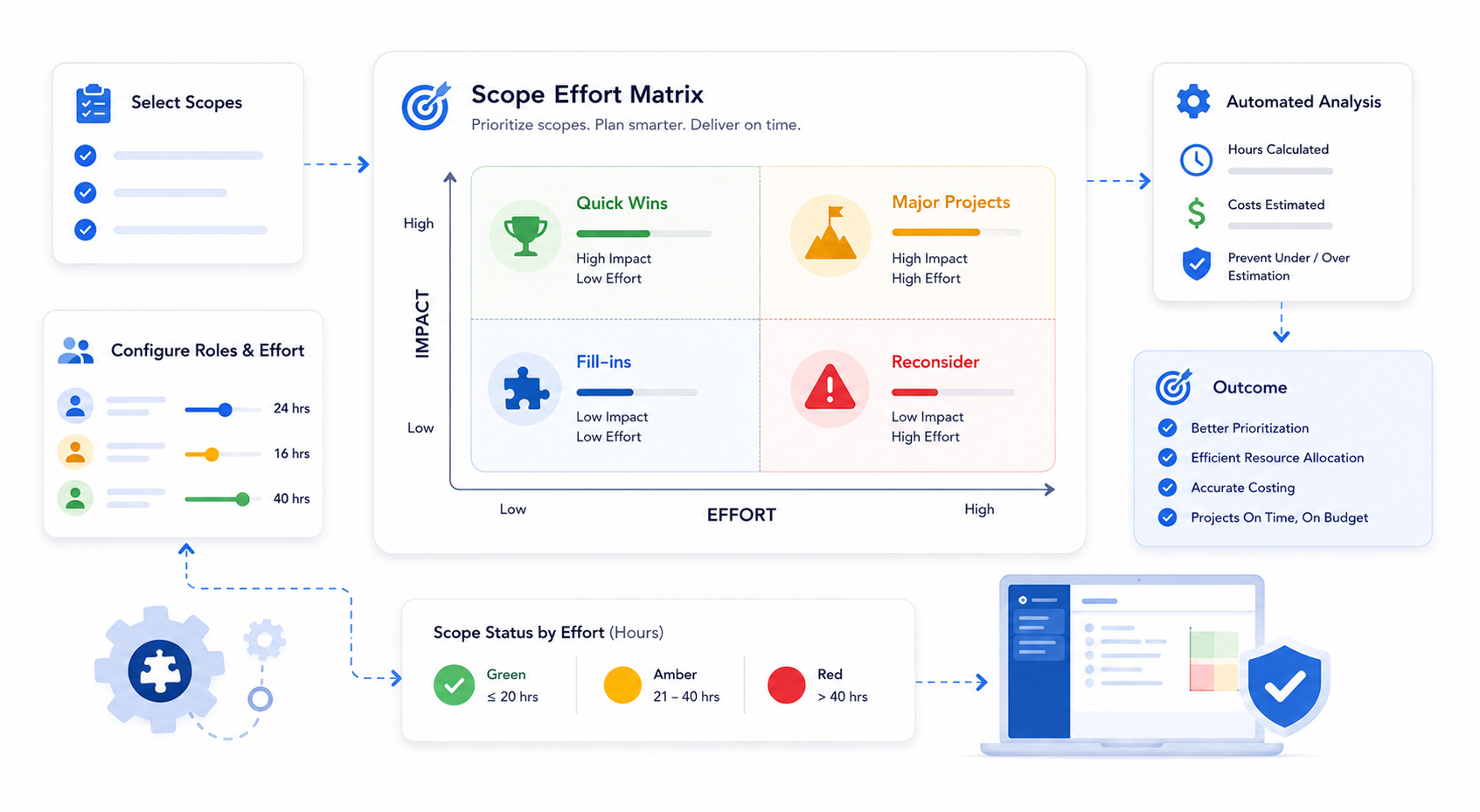
QuoteX Scope Effort Matrix Guide
This add-on is provided at no additional cost to all active QuoteX Subscribers.
Overview
The Scope Effort Matrix feature of QuoteX helps organizations prioritize scopes by evaluating their potential impact against the effort required to implement them. This feature is designed to prevent under-estimating or over-estimating project scopes, ensuring accurate and efficient project planning . It supports the sales and project planning process by aiding in the scoping of projects that are delivered on time and within budget.
Key Highlights
- Prioritization Tool : Categorizes scopes based on their impact and effort, facilitating efficient resource allocation and strategic planning.
- Streamlined Scoping and Sizing : Users can refine project scopes and sizing through iterative configuration of roles and efforts, ensuring accurate project estimates.
- Resource Allocation : Assists in the efficient allocation of resources by identifying tasks that offer the most benefit for the least effort, optimizing resource use and planning.
- Cost Estimation : Includes automated tools for calculating hours and costs, preventing underselling, and providing a clear understanding of project costs before creating timelines.
Installation and Setup Steps
1. Install the Managed Package : Ensure that QuoteX version 1.75 is already installed as a prerequisite.
2. Configure Navigation:
- Go to Setup in Salesforce and search for PSC Extensible Navigation Item .
- Manage records of PSC Extensible Navigation Item and add a new record for the 'Review Scopes & Efforts' navigation item.
- Set Is_Active to True .
- Fill ItemLabel : e.g., Review Scopes (the label that displays in the navigation item menu).
- Fill ItemValue : psce_ext:scopeEffortMatrix
- Set Order : e.g., 6 (to define the order in which this item appears among other navigation items).
3. Validation : Navigate to a Quote in QuoteX and ensure that the navigation item for Scope Review is visible.
4. View Scope Reviews Module : Access the Scope Reviews Module for the existing Quote.
5. Update Hours for Amber and Red Statuses :
- Go to Setup and search for Custom Labels .
- Search for the following labels:
- RedIfHoursGreaterThan (default: 40 hours)
- AmberIfHoursGreaterThan (default: 20 hours)
- These values support only integers with no fraction digits.
6. Validate Changes : On the quote record, navigate to the 'Review Scopes' section and ensure that the hours and statuses reflect the changes made.
Conclusion
By using the Scope Effort Matrix feature, organizations can achieve better project management by prioritizing scopes effectively, allocating resources efficiently, and accurately estimating costs. This tool enhances decision-making, ensuring that projects align with business goals and deliver maximum value.